
How to Check Your Pet's Microchip Registration
Check whether your pet's microchip is registered, then confirm your contact details with the registry. A chip number alone does not confirm owner registration.
How to Check Pet Microchip Registration
For a dog or cat, start with the microchip number. Use AAHA's lookup to find participating registries, then contact the listed registry to check your pet's record and current contact details.

Get the Microchip ID
-
Check Your Pet's Records
Look for the microchip ID on the registration card, adoption paperwork, or veterinary record.
-
Ask Your Vet if Needed
If you cannot find the number, ask your veterinary clinic to scan your pet and record it.

Find the Registry
-
Enter the Microchip Number
Use AAHA's Universal Pet Microchip Lookup Tool. Enter the number without spaces or punctuation, then check it for errors.
-
Read the Results
Note the registries listed and their contact information.

Confirm the Record
-
Contact the Registry
Use its account or support process to verify your pet's record and your current contact details.
-
Save Your Confirmation
Keep the registry name, microchip number, and confirmation with your pet's records.
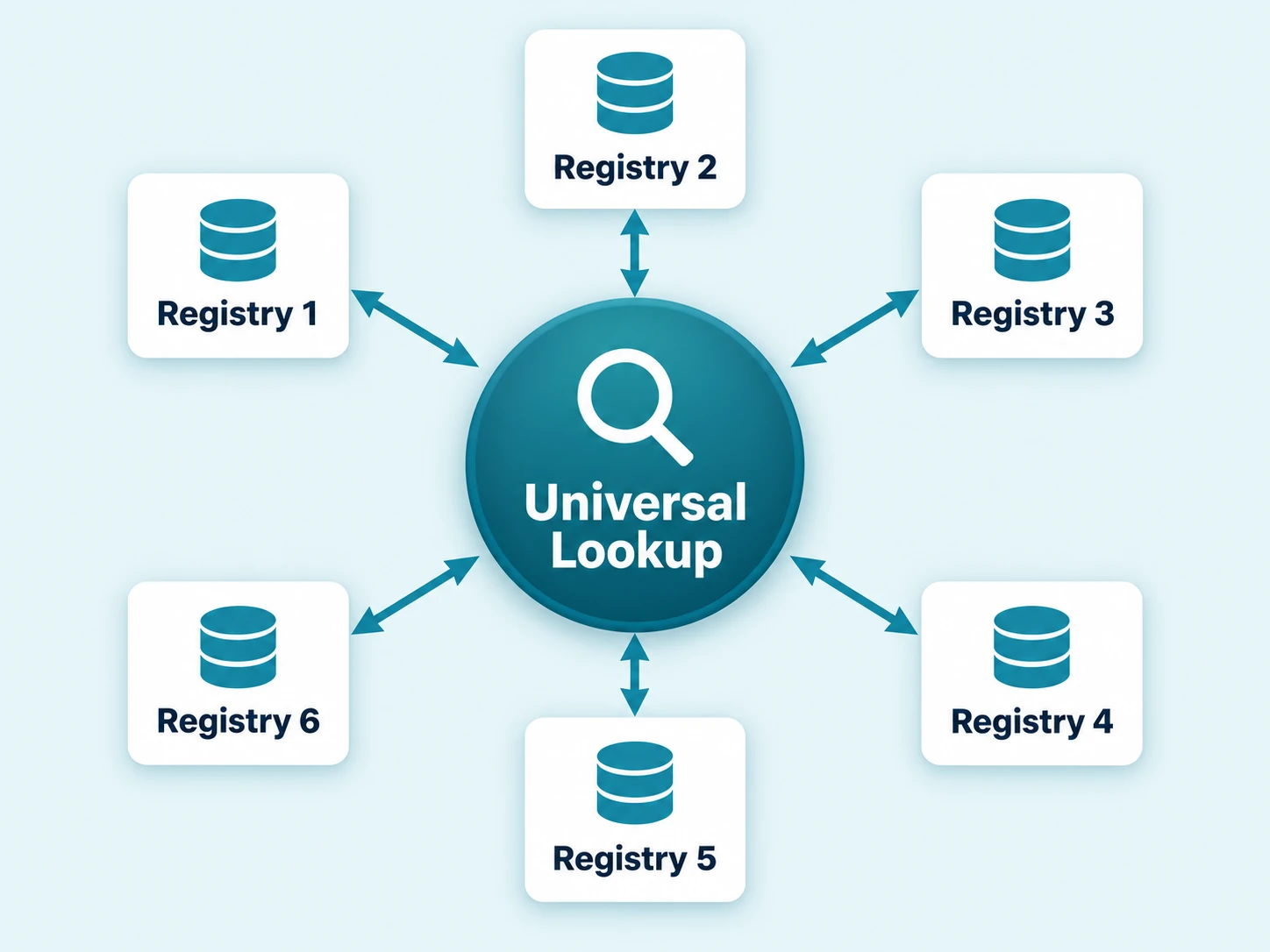
How AAHA's Microchip Lookup Works
In the U.S., pet microchip records are held by separate registries. AAHA's Universal Pet Microchip Lookup Tool helps you find participating registries associated with a microchip number.
- Registry contacts: Results provide registry contact information, not owner names or phone numbers.
- Lookup limits: A missing result does not prove your pet is unregistered. Some results identify a manufacturer or distributor instead of a registry record.
Contact the listed registry to confirm what its record contains and whether your contact details are current.
Four Microchip Registration Details to Check
Finding your pet's microchip registry gets you to the right place. Review the actual record there, and follow the registry's process for any corrections.
-
Match the Microchip Number
Compare the number on the record with your pet's paperwork or the number read during a scan. Ask your clinic about any mismatch.
-
Check the Pet Details
Confirm the record describes your pet. If it lists a previous owner, ask the registry about its transfer process.
-
Check Your Contact Details
Review the phone number, email, address, and any other contact fields the registry maintains. Update information that has changed.
-
Confirm and Save
Confirm that corrections were saved. Keep the registry's confirmation and contact information with your pet's records.
What if My Pet Isn't Registered?
If your pet has no registration, ask your clinic or chip provider which registry to use and follow its enrollment process.
- Confirm it is unregistered: A missing result in AAHA's lookup does not prove there is no registration; the tool only searches participating registries. Check the number, and ask your clinic or provider which registry they used.
- Pick the registry: Your clinic or provider can name the registry (TraqPaw microchips use Pet Registration and Recovery). Otherwise, choose one that participates in AAHA's lookup. Terms vary by registry, so check them before enrolling.
- Enroll: Provide the microchip number, pet details, and current contact information, including phone, email, and address.
- Confirm and keep records: Confirm the record saved correctly, keep the registry name, microchip number, and confirmation with your pet's records, and tell your clinic so its record matches.
If the record lists your clinic instead of you, the TraqPaw section below explains the next step.

What if the Record Lists My Clinic?
TraqPaw pre-registration associates the microchip number with your clinic through Pet Registration and Recovery (PRR). That clinic association does not confirm that your owner registration is complete.
- Check your registration card: Use the supplied instructions to contact PRR about your pet's record.
- Confirm your details: Make sure the record includes your pet and current contact information.
- Keep your clinic updated: A clinic contact route depends on a matching patient record and a way to reach you.
If you no longer have the card, ask your clinic for the microchip number and registration instructions.
Microchip Registration Check Questions
-
Is my pet's microchip registered?
Confirm it with the registry holding your pet's record. Use the microchip number to find the registry through your paperwork or AAHA's lookup, then check the pet and owner details directly. A lookup result alone does not confirm that your contact information is complete or current.
-
Can I check registration without the microchip number?
AAHA's lookup needs the microchip number. Check your registration card, adoption paperwork, or veterinary record. If you cannot find it, ask your clinic to scan your pet.
-
Can AAHA show me the owner's name or phone number?
No. The lookup identifies participating registries and provides their contact information. Owner information stays with the registry, which handles access and contact requests through its own process.
-
Why are several registries listed for one microchip?
The same microchip number can have records in more than one registry. AAHA lists the most recently updated record first, but that does not guarantee its details are correct. Check the listed registries for outdated or conflicting information.
-
What if the lookup only lists a microchip manufacturer or distributor?
A manufacturer or distributor result may identify who supplied the chip. It does not confirm owner registration. Contact the listed company or your clinic for registration instructions and help tracing the chip number.
-
Does no match mean I need to register again?
Not necessarily. First check the number, your paperwork, and the registry or provider named by your clinic. AAHA searches participating registries, so a missing result does not prove there is no registration.
-
Who can fix an old phone number or previous owner's record?
Contact the registry holding that record. AAHA cannot change it. Use the registry's update or ownership-transfer process, and update your veterinary clinic separately. A change to the clinic's patient record does not necessarily change the registry record.
-
What if I found someone else's pet?
Ask a veterinary clinic or animal shelter to scan the pet and help contact the registry. Do not enroll the microchip as your own. The registry can use its existing record and procedures to help reach the owner.
Common Pet Microchip Terms
Keep Your Pet's Registration Information Handy
Understand registration: Read Pet Microchip Registration: What It Is and Why It Matters for the relationship between the chip, owner details, and clinic pre-registration.
Understand the systems: Compare pet microchips and registries. Veterinary teams can also review clinic pre-registration and choosing a pet microchip registry.
Find a registry: Use AAHA's Universal Pet Microchip Lookup Tool. Its lookup FAQs explain participating registries, result ordering, and manufacturer information.
For TraqPaw owners: Follow your clinic's instructions for Pet Registration and Recovery. Contact the registry to check or update the record it holds.
Updated September 14, 2026. This guide is intended for U.S. pet owners and veterinary practices.
Help Owners Complete the Registration Step
Explore TraqPaw microchips, clinic pre-registration, and the registration materials your team can send home with pet owners.